Guide
Password security without the folklore
Most password advice people remember dates from the 2000s, and several parts of it have since been withdrawn by the organisations that issued it. Here is what the mechanism actually is.
The real risk is reuse, not weakness
People imagine an attacker sitting at a login form guessing. That is not what happens. What happens is this:
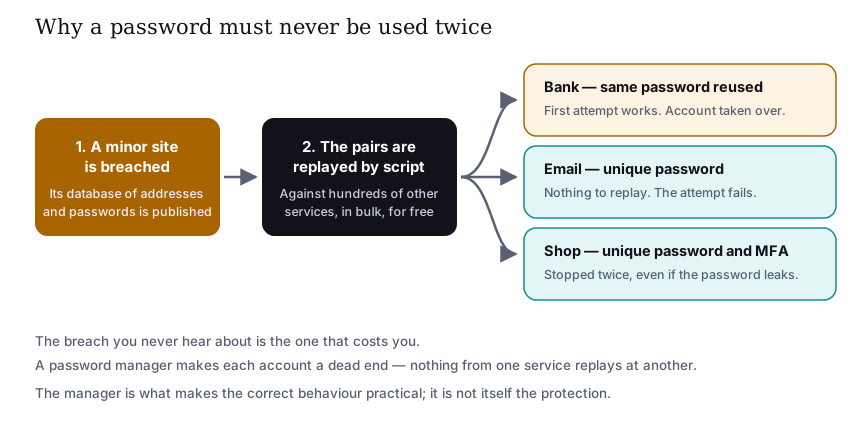
A site you barely remember signing up to is breached. Its table of email addresses and passwords is published or sold. Automated tools then replay every pair against hundreds of other services. The attempt costs the attacker nothing, so it is made against everyone. Wherever you reused that password, the account opens on the first try, and the strength of the password is entirely beside the point — it was not guessed, it was read.
This is why a unique password per account is the single highest-value habit in personal security. Not a stronger password: a different one, everywhere.
What actually makes a password hard to guess
Length dominates. A passphrase of four or five unrelated words is both easier to remember and harder to attack
than a short string decorated with substitutions. The substitutions everyone was taught — a to
@, o to 0, an exclamation mark on the end — are in every cracking
dictionary, because everybody was taught the same ones.
- Long beats complicated. Prefer a memorable phrase over a short cipher.
- Unpredictable beats clever. Anything derived from your life — names, dates, the site’s own name — is guessable by someone who has looked you up.
- Forced expiry has been withdrawn as general advice. Both the US National Institute of Standards and Technology and the UK National Cyber Security Centre now advise against routine periodic password changes for ordinary accounts, because in practice it pushes people towards predictable increments. Change a password when there is a reason to: a breach, a suspicion, or a shared secret.
- Check exposure. Have I Been Pwned lets you check whether an address appears in a known breach. If it does, change that password and anywhere you reused it.
Password managers, honestly
A manager generates a different long random password for every site and fills it in for you. It is the only practical way to hold hundreds of unique passwords. Two points people rarely hear:
- The manager is not the protection. Uniqueness is the protection; the manager is what makes uniqueness survivable in daily life.
- It concentrates risk, deliberately. One strong master password, protected by multi-factor authentication, guarding everything. That is a good trade, but only if the master password is strong, unique and not stored anywhere else.
A manager bundled into a security suite, a standalone manager, or the one built into your browser or operating system are all enormously better than reuse. Pick whichever you will genuinely use.
Multi-factor authentication: where to start
Multi-factor authentication means a password plus something else. It defeats credential stuffing outright, because a leaked password is no longer sufficient. Turn it on in this order:
- Your email account, first and above all. Whoever controls your email can reset every other account you own. Everything else is secondary to this.
- Banking and payment accounts.
- Cloud storage and password manager.
- Anything holding personal documents or a saved payment method.
On method: an authenticator app or a hardware security key is stronger than a code sent by SMS, because SMS can be intercepted through SIM-swap fraud. That said, SMS is far better than nothing, and if it is the only option a service offers, use it. Passkeys, where offered, remove the password entirely and cannot be phished in the usual way.
The one rule that survives everything. A one-time code is never to be read out to anybody, on any call, for any reason. No genuine bank, platform or delivery company will ever ask you for one. A caller asking for a code is the attack, without exception.
Sources
- NIST SP 800-63B — digital identity guidelines, including the withdrawal of routine password expiry.
- UK National Cyber Security Centre — password guidance and the case against forced rotation.
- Have I Been Pwned — breach exposure lookup.
- passkeys.dev — developer and user documentation on passkeys, maintained with the FIDO Alliance and W3C WebAuthn community.
- W3C Web Authentication (WebAuthn) Level 3 — the specification behind passkeys and security keys.
Diagram drawn for slovaris.online as an original SVG. Written by Ava Johnson. Corrections to info@slovaris.online.