Guide
How to spot a phishing message
Filters catch most of it. What reaches you is, by definition, what got past a filter — so the useful skill is recognising the shape of the thing yourself. Almost every phishing message carries the same handful of signals.
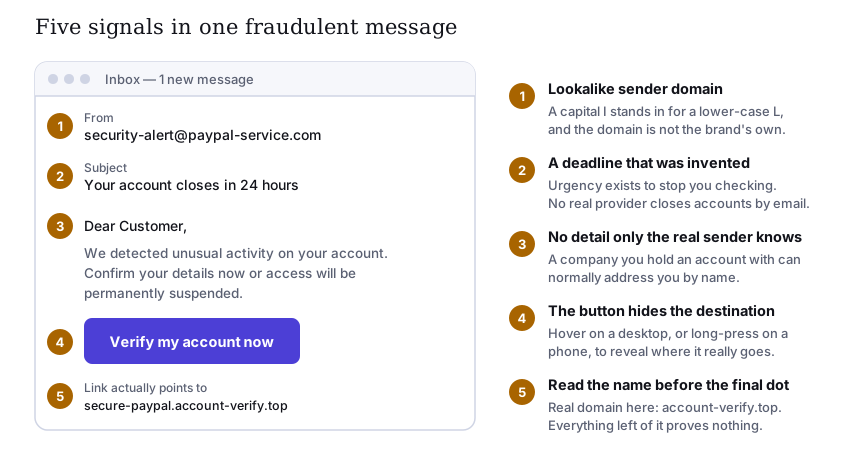
The five signals
1. A sender address that is nearly right
Lookalike domains substitute a capital I for a lower-case l, a zero for an O,
rn for m, or simply append the brand name to a domain the attacker owns. The display name
is worth nothing at all: anyone can set it to anything.
2. A deadline that was invented
“Within 24 hours”, “immediate suspension”, “final notice”. Urgency exists to stop you checking. Banks, tax authorities and service providers do not close accounts by email on a same-day deadline, and a genuine deadline will still be there when you log in through your own bookmark.
3. No detail only the real sender could know
“Dear Customer” from a company that has your name on file is a signal. So is a message about an account you do not hold, a delivery you did not order, or an invoice from a supplier you have never used.
4. A button that hides its destination
Link text is free-form. It can read https://www.yourbank.com and point anywhere. On a desktop, hover
and read the status bar. On a phone, press and hold until the real address appears. Do this before tapping, not
after.
5. The check that always works: read the name before the final dot
This is the one to internalise. In an address such as
secure-paypal.account-verify.top/login, the registrable domain is
account-verify.top — the label immediately to the left of the final dot, together with that
ending. Everything to the left of it is chosen freely by whoever registered the domain. A subdomain can say
paypal, login, secure or anything else, and it proves nothing whatsoever.
The habit that removes the problem. Never navigate from a message. If a message says your bank needs attention, close it and reach the bank the way you normally do: your own bookmark, or the app. If the message was genuine, the same notice will be waiting for you there. This single habit defeats phishing regardless of how convincing the message is.
Variants worth knowing
- Smishing — the same technique over SMS or a messaging app, usually as a missed-delivery or customs-fee notice. Short links hide the destination completely.
- Vishing — a phone call, often following the email, from “your bank’s fraud department”. No legitimate institution will ever ask you to move money to a “safe account”, or to read out a one-time code. Hang up and call the number on your card.
- Business email compromise — a real, compromised account sends a genuine-looking request to change bank details. Verify any change of payment details by a channel you chose, using a number you already had.
- Multi-factor fatigue — repeated approval prompts until you tap one to make them stop. Repeated unexpected prompts mean someone already has your password. Deny, then change it.
- Search and advertisement poisoning — a fraudulent site bought its way to the top of the results page for a software download. Type the address, or use a bookmark.
If you have already clicked
- If you entered a password, change it now on the real site — and everywhere you reused it.
- Turn on multi-factor authentication on that account, starting with your email.
- If you entered card details, contact your bank and ask them to block the card.
- If you downloaded and ran something, disconnect from the network and run a full scan. For a serious compromise, reinstalling the operating system is the only complete answer.
- Check the account’s recovery settings — attackers routinely add their own recovery address or forwarding rule, which survives a password change.
Sources
- UK National Cyber Security Centre — phishing guidance for individuals and organisations.
- ENISA — European Union Agency for Cybersecurity, threat landscape reporting.
- US Federal Trade Commission — how to recognise and avoid phishing scams.
Diagram drawn for slovaris.online as an original SVG. Written by Ava Johnson. Corrections to info@slovaris.online.